FREE SHIPPING ON ORDERS OVER £50


UWEI Pro Thermal Inspection Camera
Quantity
UWEI Pro Thermal Inspection Camera
Compact, reliable, and built for fast diagnostics, the UWEI Pro Thermal Inspection Camera allows you to detect heat issues instantly in electrical systems, HVAC units, automotive components, and home inspections.
Featuring a 1.77” TFT color display and multiple imaging modes, it delivers clear thermal, visible light, and fusion images for accurate analysis in any environment.
Key Features
-
32 × 32 infrared thermal resolution
-
128 × 128 visible light camera
-
Thermal, visible, and fusion image modes
-
Temperature range from -30°C to 500°C
-
Adjustable emissivity (0.01 – 1.00) for precise readings
-
6 color palettes including Rainbow, Iron Red, White Hot, and Black Hot
-
USB-C rechargeable 1000mAh battery
-
8GB memory card included

Temperature measurement range: -30℃ to +500℃ (-22℉ to 932℉)

SD TF CARD SLOT
There are a 8 GB Memory Card in the package, you can change memory card to a larger one or change a new card when the 8 GB Card is fulled. BMP format file,it can be connected to a computer to analyze pictures. Please be noted that the memory card needs to use with a card reader (no included) to read the data.

The Right Tool for the Job: Choose Your Palette
Don't let critical thermal data go unnoticed. Our range of color palettes is engineered to match your specific professional needs:
-
For Electrical & Mechanical Inspections: Rely on Ironbow for clear, intuitive hotspot detection.
-
For Scientific & Medical Precision: Use Rainbow to visualize the most subtle thermal variations.
-
For Security & Safety Missions: Trust White Hot for maximum detail and reduced eye strain over long periods.
-
For High-Temperature & Firefighting: Identify threats instantly with the Lava palette.
-
For Building & Energy Audits: Detect heat loss and insulation gaps effectively with the Arctic palette.


COLOR CLARITY ADJUSTMENT
you can adjust the increase key to make the thermal picture vividly.

6 Multi-Languages Operating System

USB TYPE-C RECHARGEABLE  CALIBRATE FUNCTION
If the thermal image and the measure item can not match together,Hold trigger key + M key together entering calibration menu.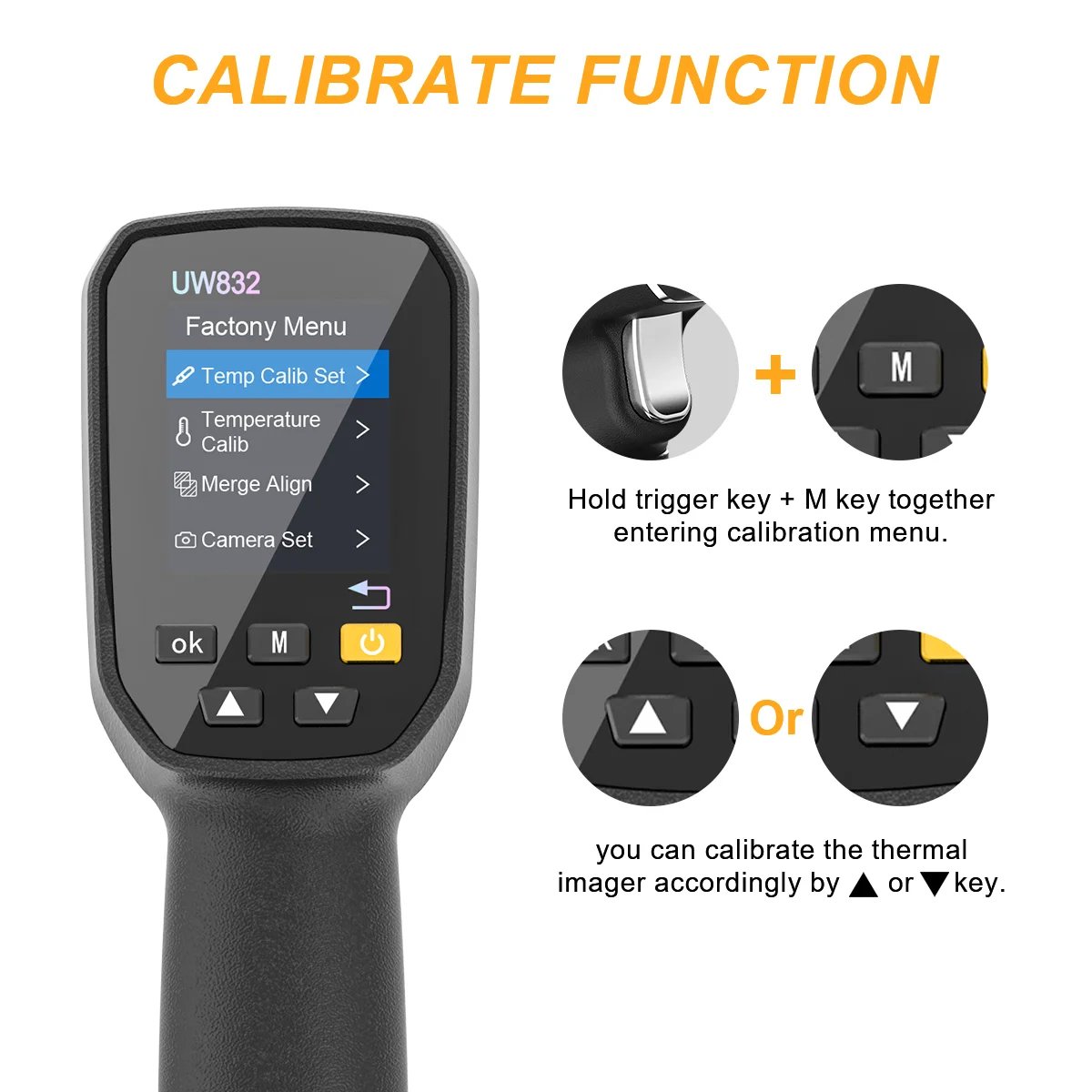 After Calibration


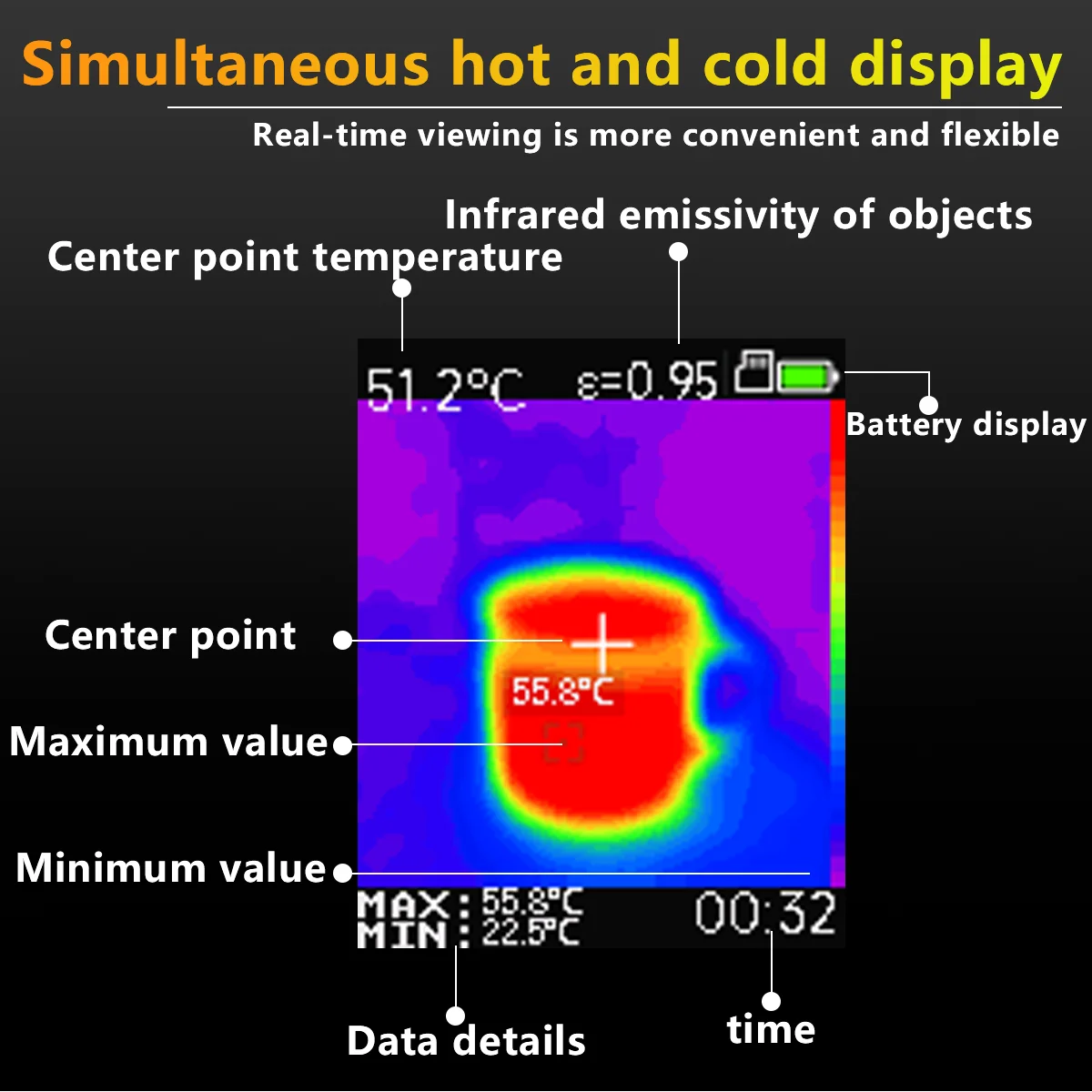

 Package Including :
1* Infrared Thermal Imager
1* USB Cable
1* Lanyard
1* 8 GB TF Card
1* Carry Box
1* User Manual

FAQ
Q1: What are the basic specifications of the 32x32 thermal imager?
A: It is a basic thermal imaging product with 32x32 resolution. Its imaging performance cannot be compared to higher-resolution models e.g., 120x90 or 256x192. if you want a high- end thermal imager, you need to buy other product with high resolution.
Q2: How to ensure temperature measurement accuracy?
A: Set the correct emissivity based on the material (default: 0.96 for water). Refer to the Emissivity chart.

Q3:What is the best measuring distance?
A: The best distance for Thermal image and measuring object is 50-80 cm. Beyond this range, image quality and temperature accuracy will degrade.
Q4:How do I fix misaligned thermal and camera images?
A: Calibrate the Merge Align, here are steps for you:
1. Hold the trigger key and M key together to enter Factory Menu.
2. Select the Merge Align Setting and click ok key to enter calibrate menu.
3. Adjust horizontal (X)-axis and vertical (Y)-axis offset values by Up and Down buttons, and using the M key to switch axes to move the position of the thermal image.
4. When the thermal image match with the item that means both images align, Press OK key to save the setting.
Q5: What issues can be fixed by restarting the device?
A: Restart if you encounter:
1.Missing thermal camera images after startup.
2.Frozen screen.
3.SD card read errors.
4.Screen abnormalities e.g., white distorted display.
If issues persist after multiple restarts, contact after-sales for help.
Q6: When CANNOT this imager detect temperatures?
A:It cannot detect targets temperature for below occasions,
1.Physically obscured or lacking surface temperature differences.
2.With insufficient temperature contrast against the background.
3.With very low emissivity or high reflectivity.
4.Smaller than the devices resolution.
5.That generate no measurable temperature change.
6.Affected by strong environmental interference.
Q7: What conditions are required for detecting floor heating leaks?
A:
For hot water leaks: Run the heating system for 1–3+ hours to stabilize floor temperature. Seal the room and avoid sunlight/airflow.
For cold water leaks: Inject cold water to create a temperature difference or use natural cooling (e.g., nighttime).
Avoid these pitfalls:
Stagnant water or insufficient temperature differences in pipes.
Pipes too deep to transfer heat/cold to the surface.
Concrete floors (slow heat conduction).
Q8: How to read the data?
A: By using a card reader to read the data on the computer.
Q9: How to make the thermal picture more clearly?
you can choose a colorful palettes(like rainbow) and adjust the increase key to make the picture vividly.